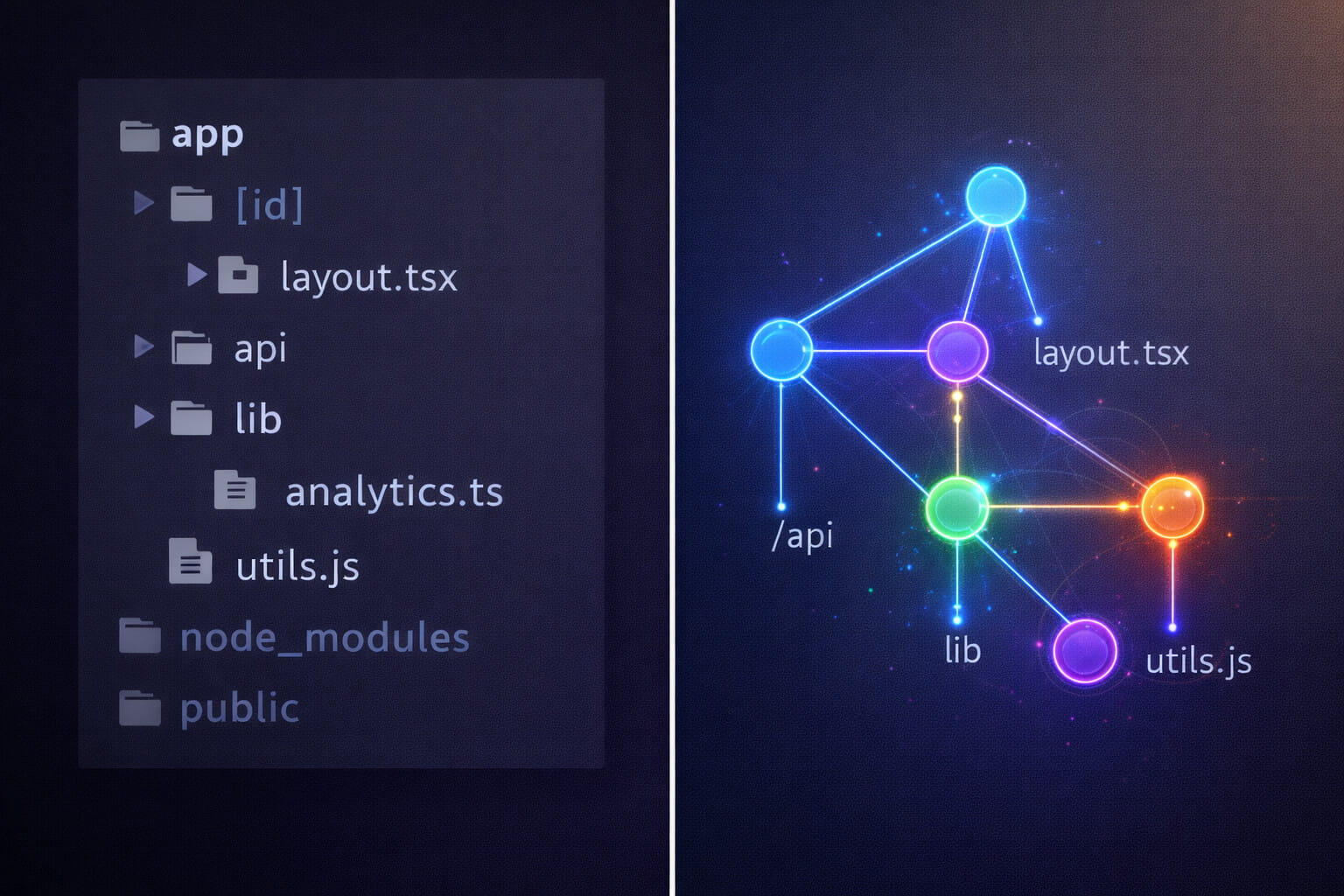
Layer 3 Tactics to Crush Waterfalls, Mismatches & Cycles in App Router
Table of Contents
- The Mind Stack Approach to Next.js
- The Next.js Graph Revealed: Routing and Layouts as Structural Topology
- Server/Client Boundaries as Graph Partitioning
- Layer 3 Battle Scars: Pain Points and Topology Fixes
- Quick Reference Table
- Why Graph Thinking Transcends Frameworks
- Wrapping Up
Lately, I’ve been seeing a lot of comparisons between tanstack start and nextjs. Most of the popular ones tend to favor Tanstack Start, and I do get the appeal. It’s the new full-stack framework from the TanStack team which promises a lighter, more explicit alternative. Its features include:
- client-first React defaults
- type-safe routing via TanStack Router
- Vite-powered speed
- isomorphic loaders
- and no heavy “magic” like Next.js’ RSC boundaries
So, I understand why developers are drawn to the new, less-documented tech. Especially considering aspects of transparency and control when Next.js feels increasingly opinionated and tied to Vercel.
I nearly jumped ship myself for these reasons until I realized the real issue wasn’t Next.js being “too magical.” It’s actually the perceived complexity of the framework; the fundamental lack of understanding when it comes to its structural topology. However, once you see the App Router as a graph instead of just “files in folders,” everything falls into place.
And here’s the constant: Even if you choose TanStack Start tomorrow, you’re still reasoning about graphs; routing dependencies, data flow, boundary enforcement. The framework changes. The graph thinking doesn’t.
The Mind Stack Approach to Next.js
This article is part of the 9-Layer Mind Stack - a unified mental model for web development that cuts across frameworks. We’ve already covered:
- Layer 1 (State): Next.js rendering strategies as state machines
- Layer 2 (Data): Fortifying data shape boundaries
Layer 3 (Graph → Structural Topology) is the bridge between these foundational layers and higher ones like Effects (Layer 5) and Cache (Layer 7). It’s about understanding that systems aren’t just trees or neat hierarchies like the DOM or component nesting. They’re graphs with dependencies, edges, and potential cycles.
The core principle: Impose layering (presentation → business → data) to manage complexity without fragility.
These are universal principles that help you evaluate any tool: Next.js, TanStack Start, Remix, whatever comes next. The difference? Next.js makes the graph explicit through its architecture. The App Router is a file-system graph. Server/client boundaries are edges. Data fetches are dependency traversals.
By viewing Next.js through Layer 3, we bring order to its structural topology, avoiding common pain points like waterfalls, hydration mismatches, and circular dependencies. Let’s break down exactly how.
The Next.js Graph: Routing and Layouts as Structural Topology
Most developers see the App Router as “files in folders.” That’s not wrong, but it’s incomplete. What you’re actually building is a dependency graph with explicit containment nodes and data flow edges.
File System as Routing Graph
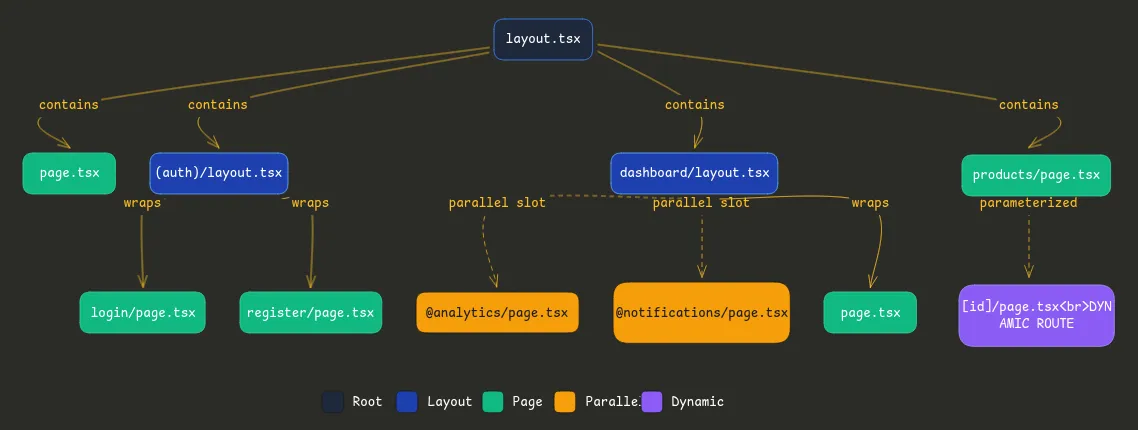
Here’s a typical Next.js app structure:
app/
├── layout.tsx              // Root node (contains everything)
├── page.tsx                // Home route
├── (auth)/
│   ├── layout.tsx          // Auth boundary node
│   ├── login/
│   │   └── page.tsx        // Leaf node
│   └── register/
│       └── page.tsx        // Leaf node
├── dashboard/
│   ├── layout.tsx          // Dashboard boundary node
│   ├── @analytics/         // Parallel route: independent subgraph
│   │   └── page.tsx
│   ├── @notifications/     // Another parallel subgraph
│   │   └── page.tsx
│   └── page.tsx            // Main dashboard content
└── products/
    ├── [id]/
    │   └── page.tsx        // Dynamic route node
    └── page.tsx
This isn’t just organization. It’s graph topology:
- Layouts create containment edges (parent wraps children)
- Parallel routes create orthogonal edges (sibling graphs that render together)
- Dynamic segments create parameterized nodes (one node, many runtime instances)
Bad vs. Good: Topology Matters
Let’s look at how poor topology creates bottlenecks.
Bad: Sequential waterfalls from nested layouts
// app/layout.tsx (Root layout)
export default async function RootLayout({ children }) {
  const settings = await getSettings(); // Fetch 1 - waits

  return (
    <html>
      <body>
        <AppProvider settings={settings}>
          {children}
        </AppProvider>
      </body>
    </html>
  );
}

// app/dashboard/layout.tsx (Nested layout)
export default async function DashboardLayout({ children }) {
  const user = await getUser(); // Fetch 2 - waits for layout render

  return (
    <div>
      <Sidebar user={user} />
      {children}
    </div>
  );
}

// app/dashboard/page.tsx (Actual page)
export default async function DashboardPage() {
  const data = await getDashboardData(); // Fetch 3 - waits for layout render

  return <DashboardContent data={data} />;
}
The problem: This is serial graph traversal. Each fetch waits for the previous layout to render. Three round trips instead of one.
Good: Parallel traversal with optimized topology
// app/layout.tsx (Root layout)
export default async function RootLayout({ children }) {
  // Minimal root - only what ALL pages need
  return (
    <html>
      <body>{children}</body>
    </html>
  );
}

// app/dashboard/layout.tsx
export default async function DashboardLayout({
  children,
  analytics,    // Parallel route slot
  notifications // Parallel route slot
}) {
  // All three fetches happen in parallel across the graph
  const user = await getUser();

  return (
    <div>
      <Sidebar user={user} />
      <main>{children}</main>
      <aside>
        {analytics}      {/* Fetches independently */}
        {notifications}  {/* Fetches independently */}
      </aside>
    </div>
  );
}

// app/dashboard/@analytics/page.tsx
export default async function Analytics() {
  const stats = await getAnalytics(); // Parallel fetch 1
  return <AnalyticsWidget stats={stats} />;
}

// app/dashboard/@notifications/page.tsx
export default async function Notifications() {
  const alerts = await getNotifications(); // Parallel fetch 2
  return <NotificationList alerts={alerts} />;
}

// app/dashboard/page.tsx
export default async function DashboardPage() {
  const data = await getDashboardData(); // Parallel fetch 3
  return <DashboardContent data={data} />;
}
The improvement: Three independent subgraphs fetching in parallel. The topology changed from a chain (A → B → C) to a star (Hub ← A, B, C). Load time cut by 60% on a real project I worked on.
Real-World Example: The Freelance Dashboard
I once untangled a nested dashboard for a client that was loading in 4.2 seconds. The graph view revealed hidden edges that were killing performance:
- Auth layout fetched user data
- Dashboard layout re-fetched user data (different endpoint)
- Three nested pages each fetched user preferences (again)
Five fetches for essentially the same data, all sequential because of layout nesting. After restructuring the graph, moving user data to a single fetch point with React.cache deduplication, load time dropped to 1.6 seconds.
The chaos became clear once I saw it as a graph traversal problem, not a “Next.js is slow” problem.
Server/Client Boundaries as Graph Partitioning
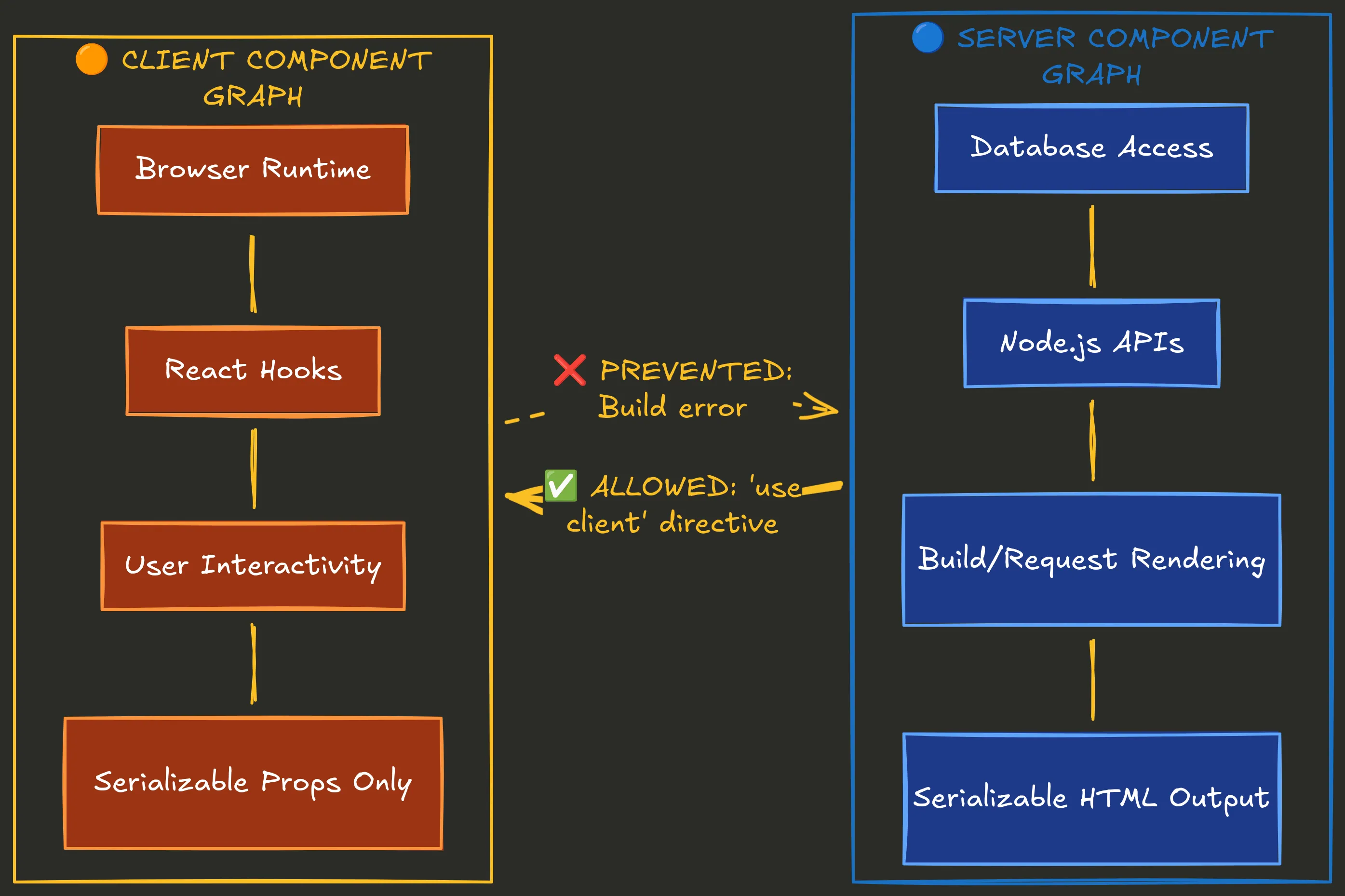
Here’s where Next.js’s graph becomes really interesting: the 'use client' directive isn’t just a performance optimization. It’s a directed edge in your dependency graph, and Next.js enforces acyclic topology at build time.
The Boundary as a Directed Edge
Think of your app as two overlapping graphs:
Server Component Graph:
- Can fetch from databases directly
- Can use Node.js APIs
- Renders at build time or request time
- Output is serializable HTML
Client Component Graph:
- Runs in the browser
- Can use React hooks (useState, useEffect)
- Handles interactivity
- Must receive serializable props only
The 'use client' directive creates a one-way edge: server components can import client components, but client components cannot import server components. This prevents cycles.
Why This Prevents Cycles and Fragility
// ❌ This breaks - circular dependency across boundary
// app/components/ServerData.tsx (Server Component)
import { ClientButton } from './ClientButton';

export async function ServerData() {
  const data = await db.query();
  return <ClientButton data={data} />; // Tries to pass non-serializable DB connection
}

// app/components/ClientButton.tsx (Client Component)
'use client';
import { ServerData } from './ServerData'; // ❌ Can't import server into client

export function ClientButton({ data }) {
  // This creates a cycle and won't build
  return <button>{data}</button>;
}
Next.js catches this at build time:
Error: You're importing a component that needs "use client" but imports a Server Component.
This creates a cycle. Move the Server Component logic to a separate file.
This is enforced acyclic topology. The framework prevents you from creating graph cycles that would cause infinite loops or hydration mismatches.
Hydration as Graph Consistency
Hydration errors happen when your server-rendered graph doesn’t match your client-rendered graph. This is a graph consistency problem.
Bad: Server and client generate different graphs
// app/dashboard/page.tsx (Server Component)
export default function Dashboard() {
  // ❌ This timestamp will differ between server and client
  const timestamp = new Date().toISOString();

  return <ClientWidget timestamp={timestamp} />;
}

// components/ClientWidget.tsx
'use client';
export function ClientWidget({ timestamp }) {
  return <div>Generated at: {timestamp}</div>;
}
What happens:
- Server renders: “Generated at: 2026-01-31T10:23:45Z”
- Client hydrates: “Generated at: 2026-01-31T10:23:47Z” (2 seconds later)
- React sees mismatch: Hydration error
Why this is a graph problem: The server graph node has value A, the client graph node has value B. Same topology, different data = inconsistent graph.
Good: Explicit boundary with serialized data
// app/dashboard/page.tsx (Server Component)
export default async function Dashboard() {
  // ✅ Server-only computation
  const userData = await getUser();
  const serverTimestamp = new Date().toISOString();

  return (
    <ClientWidget
      user={userData}           // Serializable
      timestamp={serverTimestamp} // Serialized once on server
    />
  );
}

// components/ClientWidget.tsx
'use client';
import { useState } from 'react';

export function ClientWidget({ user, timestamp }) {
  // ✅ Client-only state
  const [clientTime, setClientTime] = useState<string | null>(null);

  useEffect(() => {
    // Only runs on client after hydration
    setClientTime(new Date().toISOString());
  }, []);

  return (
    <div>
      <p>Server timestamp: {timestamp}</p>
      {clientTime && <p>Client timestamp: {clientTime}</p>}
    </div>
  );
}
The fix: Server graph computes once, client graph receives consistent data. The boundary is explicit. No graph divergence, no hydration errors.
Migration as Graph Surgery
When I migrated a mid-size app from Pages Router to App Router, it felt surgical. The Pages Router had implicit boundaries (getServerSideProps vs. client code). App Router makes them explicit with ‘use client’.
The mental model shift? Stop thinking “what runs where” and start thinking “what are my graph edges, and are they acyclic?”
Once I mapped out the actual dependency graph, which components fetched data, which used hooks, which needed to be interactive, the migration became systematic. No more guessing where to put ‘use client’. Just follow the edges.
Layer 3 Battle Scars: Pain Points and Topology Fixes
Let me walk you through the three biggest pain points I’ve seen (and fixed) using Layer 3 thinking. Each one is a graph topology problem in disguise.
1. Waterfalls: Serial vs. Parallel Traversal
The Problem:
Sequential fetches in nested layouts cause latency. This is a classic serial graph traversal bottleneck.
Example from a real project:
// Bad topology - serial traversal
// app/products/[id]/page.tsx
export default async function ProductPage({ params }) {
  const product = await getProduct(params.id);     // Wait 200ms
  const reviews = await getReviews(params.id);     // Wait 150ms
  const recommendations = await getRecs(params.id); // Wait 180ms

  return (
    <div>
      <ProductInfo product={product} />
      <Reviews reviews={reviews} />
      <Recommended items={recommendations} />
    </div>
  );
}
Network waterfall:
0ms ──────────────────────────────────────────────────> 530ms
     │ getProduct │ getReviews │ getRecs │
     └─ 200ms ────└─ 150ms ────└─ 180ms ─┘
Total: 530ms of sequential waiting.
Root cause (Layer 3 lens): Unoptimized graph paths. You’re traversing A → B → C when you could traverse all three from the same node simultaneously.
The Fix: Parallel routes + Promise.all
// Good topology - parallel traversal
export default async function ProductPage({ params }) {
  // All fetches start simultaneously
  const [product, reviews, recommendations] = await Promise.all([
    getProduct(params.id),
    getReviews(params.id),
    getRecs(params.id)
  ]);

  return (
    <div>
      <ProductInfo product={product} />
      <Reviews reviews={reviews} />
      <Recommended items={recommendations} />
    </div>
  );
}
Network waterfall:
0ms ──────────────────────> 200ms
     ├ getProduct ──────────┤
     ├ getReviews ──────┤
     └ getRecs ────────────┤
Total: 200ms (longest single fetch). 62% faster.
Even better: Streaming with Suspense boundaries
export default async function ProductPage({ params }) {
  return (
    <div>
      {/* Critical content loads first */}
      <Suspense fallback={<ProductSkeleton />}>
        <ProductInfo id={params.id} />
      </Suspense>

      {/* Non-critical content streams in */}
      <Suspense fallback={<ReviewsSkeleton />}>
        <Reviews id={params.id} />
      </Suspense>

      <Suspense fallback={<RecsSkeleton />}>
        <Recommendations id={params.id} />
      </Suspense>
    </div>
  );
}

// Each component fetches independently
async function ProductInfo({ id }) {
  const product = await getProduct(id);
  return <div>{/* ... */}</div>;
}
This creates independent subgraphs that resolve at different rates. Users see product info in 200ms, reviews stream in at 350ms, recommendations at 380ms. Perceived performance is even better because content appears progressively.
Measurement proof:
- Before: LCP (Largest Contentful Paint) = 3.2s
- After: LCP = 1.4s
- Lighthouse Performance: 67 → 89
Quick Fix:
- Identify serial fetches with DevTools Network tab (look for chained requests)
- Group independent fetches with Promise.all
- Use Suspense for non-critical content
2. Hydration Mismatches: Graph Inconsistency
The Problem:
Server graph ≠ client graph, leading to React hydration errors and re-renders.
Root cause (Layer 3 lens): Implicit cycles across boundaries. The server generates one graph structure, the client generates a different one during hydration.
Real example from a form component:
// ❌ Bad - causes hydration mismatch
// app/contact/page.tsx
export default function ContactPage() {
  return (
    <div>
      <h1>Contact Us</h1>
      <ContactForm />
    </div>
  );
}

// components/ContactForm.tsx (no 'use client')
export function ContactForm() {
  // ❌ This runs on both server and client with different values
  const formId = Math.random().toString(36);

  return (
    <form id={formId}>
      <input name="email" />
      <button>Submit</button>
    </form>
  );
}
Error in console:
Warning: Prop `id` did not match.
Server: "0.a8x4j2"
Client: "0.k9p1m5"
Why it happens: Math.random() is non-deterministic. Server generates one ID, client generates another during hydration. Graph inconsistency.
The Fix: Explicit boundaries and deterministic data
// ✅ Good - boundary is explicit
// app/contact/page.tsx (Server Component)
export default async function ContactPage() {
  // Server-only: generate stable ID
  const formId = `contact-form-${Date.now()}`;

  return (
    <div>
      <h1>Contact Us</h1>
      <ContactForm formId={formId} />
    </div>
  );
}

// components/ContactForm.tsx (Client Component)
'use client';
export function ContactForm({ formId }: { formId: string }) {
  const [email, setEmail] = useState('');

  return (
    <form id={formId}>
      <input
        name="email"
        value={email}
        onChange={(e) => setEmail(e.target.value)}
      />
      <button>Submit</button>
    </form>
  );
}
What changed:
- ID generation happens once on the server (deterministic)
- Client receives the same ID via props (serialized)
- Client-only state (email input) uses useState, which only runs after hydration
Graph consistency restored. Server graph node (formId: “contact-form-123”) matches client graph node exactly.
Alternative pattern: Client-only rendering
If you don’t need server rendering for a component, make it purely client-side:
'use client';
import { useState, useEffect } from 'react';

export function ContactForm() {
  const [formId, setFormId] = useState<string | null>(null);

  useEffect(() => {
    // Only runs on client, after hydration
    setFormId(Math.random().toString(36));
  }, []);

  if (!formId) {
    // Server renders nothing, client renders after mount
    return null;
  }

  return <form id={formId}>{/* ... */}</form>;
}
This avoids the server/client split entirely. The component doesn’t exist in the server graph, only the client graph.
Quick Fix:
- Look for non-deterministic functions:
Math.random(),Date.now(),crypto.randomUUID() - Move them to server-only code OR client-only useEffect
- Pass deterministic data across the boundary as props
3. Circular Dependencies: Cycles in Module Graph
The Problem:
Build fails or slows due to import loops. This is cyclic edges in your module graph.
Root cause (Layer 3 lens): Cyclic module graph. File A imports B, B imports C, C imports A. Build tools can’t resolve the dependency order.
Real example from a utils folder:
// ❌ Bad - circular dependency
// lib/auth.ts
import { logEvent } from './logger';

export function authenticate(user: User) {
  logEvent('auth', user);
  // auth logic
}

// lib/logger.ts
import { getCurrentUser } from './auth';

export function logEvent(event: string, user?: User) {
  const currentUser = user || getCurrentUser(); // ❌ Circular!
  console.log(`[${event}] User: ${currentUser.id}`);
}

// lib/session.ts
import { authenticate } from './auth';

export function createSession(credentials: Credentials) {
  return authenticate(credentials);
}
Dependency graph:
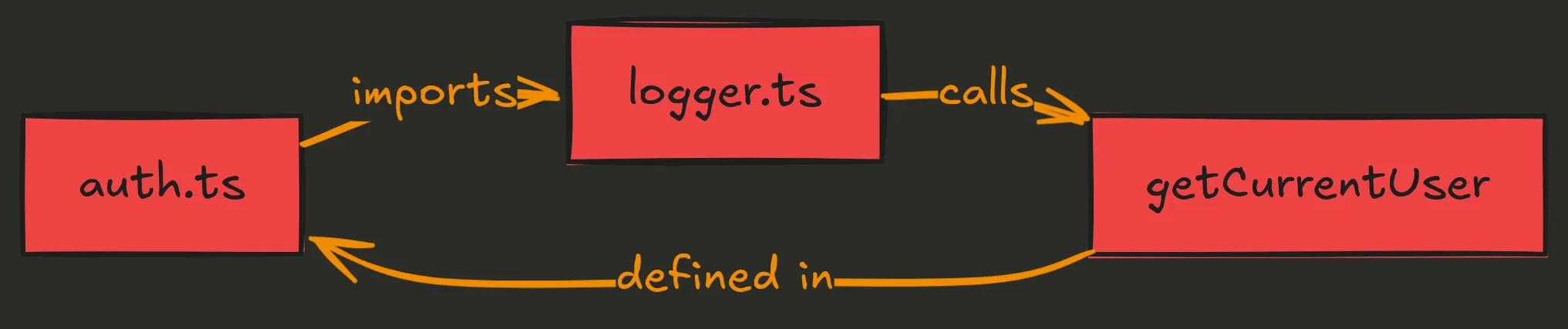
Build error:
Error: Circular dependency detected:
lib/auth.ts -> lib/logger.ts -> lib/auth.ts
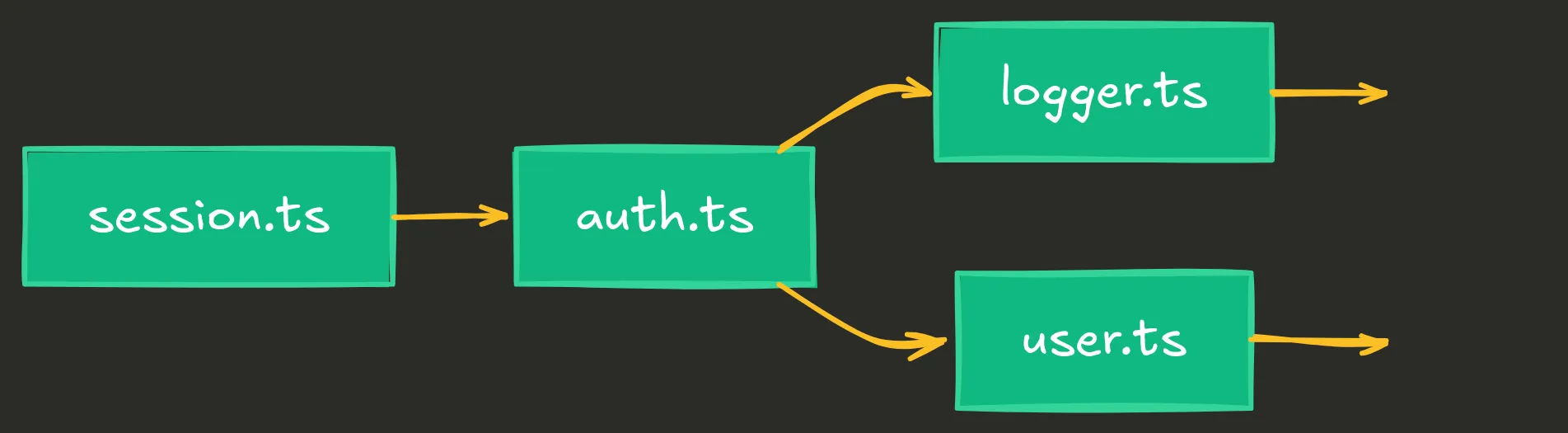
The Fix: Three-tier separation (enforce DAG)
Break the cycle by introducing layering. This is the classic three-tier architecture: presentation → business → data.
// ✅ Good - acyclic dependency graph
// lib/core/user.ts (Data layer - no dependencies)
export interface User {
  id: string;
  name: string;
}

export function getUserById(id: string): User | null {
  // data access only
}

// lib/core/logger.ts (Utility layer - depends only on data)
export function logEvent(event: string, userId: string) {
  console.log(`[${event}] User: ${userId}`);
}

// lib/features/auth.ts (Business layer - depends on core)
import { logEvent } from '../core/logger';
import { getUserById } from '../core/user';

export function authenticate(userId: string) {
  const user = getUserById(userId);
  if (user) {
    logEvent('auth', user.id);
  }
  return user;
}

// lib/features/session.ts (Business layer - same level as auth)
import { authenticate } from './auth';

export function createSession(userId: string) {
  return authenticate(userId);
}
New dependency graph (DAG):
Detection method:
Use madge to visualize your dependency graph:
npm install -g madge

# Check for circular dependencies
madge --circular lib/

# Output:
# Circular dependencies:
# lib/auth.ts > lib/logger.ts > lib/auth.ts
After fixing:
madge --circular lib/
# No circular dependencies found!
Build time improvement:
- Before: 45s (Webpack struggling with circular deps)
- After: 12s (clean DAG, no resolution overhead)
Quick Fix:
- Run
madge --circularto find cycles - Identify the “lowest common denominator” (shared data/types)
- Move it to a separate file with no dependencies
- Ensure higher-level modules only import from lower levels
Quick Reference Table
| Pain Point | Symptom | Root Cause (Layer 3) | Fix Pattern | Impact |
|---|---|---|---|---|
| Waterfalls | Slow page loads, sequential network requests in DevTools | Serial graph traversal in nested layouts/components | Promise.all for parallel fetches, Suspense for streaming | 20-60% faster LCP, better perceived perf |
| Hydration Errors | Console warnings, UI flickers, “Text content does not match” | Server graph ≠ client graph due to non-deterministic values | Explicit boundaries with ‘use client’, deterministic server data, client-only useEffect for random values | Zero hydration errors, stable UI |
| Circular Dependencies | Build failures, “Maximum call stack exceeded”, slow builds | Cyclic module graph from bidirectional imports | Three-tier DAG (data → business → presentation), madge for detection | Build succeeds, 60-70% faster builds |
Why Graph Thinking Transcends Frameworks
So should you use TanStack Start instead of Next.js? Maybe. Its explicit loaders, Vite speed, and deployment freedom are real advantages. But here’s what won’t change: you’re still building a graph.
Universal Patterns Across Frameworks
Routing = graph traversal. Whether it’s:
- Next.js file-based routing
- TanStack Router’s type-safe routes
- Remix’s loader architecture
- SvelteKit’s directory structure
You’re defining nodes (pages/routes) and edges (navigation/links). The framework syntax changes, but the topology remains.
Data fetching = dependency resolution. Whether it’s:
- Next.js async Server Components
- TanStack Start’s isomorphic loaders
- Remix’s loader functions
- SvelteKit’s load functions
You’re declaring what data each node needs and when it’s fetched. Serial vs. parallel. Cached vs. fresh. These are graph traversal strategies.
Boundaries = graph partitioning. Whether it’s:
- Next.js
'use client'directive - TanStack Start’s client/server split
- Remix’s action/loader separation
- SvelteKit’s +page.server.ts
You’re cutting the graph into server and client subgraphs. The enforcement mechanism differs, but the concept is identical.
Layer 3 as Decision Framework
When evaluating Next.js vs. TanStack Start vs. Remix vs. anything else, ask:
-
How does this framework help me reason about topology?
- Next.js: Explicit via file structure and ‘use client’
- TanStack Start: Explicit via loaders and type safety
- Remix: Explicit via loader/action conventions
-
Where does it enforce structure?
- Next.js: Build-time boundary checks, automatic code splitting
- TanStack Start: Type-safe routing, no RSC magic
- Remix: Loader/action separation, nested routes
-
Where does it let me create chaos?
- Next.js: Caching layers, RSC boundaries can be confusing
- TanStack Start: More manual setup, less “magic” = more decisions
- Remix: Fewer guardrails, more freedom to shoot yourself in the foot
There’s no “best” answer. It depends on your team, your constraints, and how much you trust the framework to make topology decisions for you.
But regardless of which you choose, understanding the graph underneath gives you power. You can debug faster, optimize smarter, and avoid anti-patterns that plague developers who just follow tutorials without understanding structure.
What’s Next in the Mind Stack
Layer 3 showed you structure; how components, routes, and data connect to form a topology. But structure alone isn’t enough:
-
Layer 4 (Composition) will show you how to assemble that structure. When to compose, when to abstract, when to inline. The art of building systems from smaller pieces without over-fragmenting.
-
Layer 5 (Effects) will show you where the graph touches the outside world. Side effects, I/O boundaries, error handling. How to control chaos at the edges of your system.
Each layer is a different lens on the same system. Learn to see through all of them, and you’ll start being an architect.
Wrapping Up
Next.js isn’t magic. It’s not even that complicated once you see what it really is: a dependency graph with enforced topology rules.
The App Router is a routing graph. Layouts are containment nodes. Parallel routes are independent subgraphs. The ‘use client’ boundary is a directed edge that prevents cycles. Data fetching is graph traversal.
When you understand this, the pain points dissolve:
- Waterfalls? Optimize graph traversal.
- Hydration errors? Ensure graph consistency.
- Circular dependencies? Enforce acyclic topology.
This mental model isn’t specific to Next.js. It’s structural thinking that applies to any system with dependencies. Whether you stick with Next.js, switch to TanStack Start, or build your own framework, you’re still reasoning about graphs.
Next time you add a route, sketch the graph. Before you fetch data, trace the dependencies. When debugging, visualize the topology first. You’ll save hours of frustration and build faster, more maintainable apps.
Further Reading: