
You know that moment when your Next.js app breaks with some cryptic error about serialization, and you’re just sitting there wondering what you did wrong to deserve this? Yeah, we’ve all been there. Turns out, most of these headaches aren’t actually bugs in your logic. They’re data shape mismatches.
Here’s one way to look at it: Your data changes form as it moves through your app, but did you bother checking if the shapes still fit together?
Let me show you how to fix this once and for all.
The Problem: Troublesome Date Objects
Here’s a scenario that’ll feel familiar. You’re building a blog in Next.js 16. Nothing fancy, just fetching some posts and displaying them. You grab the data in a Server Component, pass it down to a Client Component, and…
Error: Error serializing `.posts[0].createdAt` returned from getServerSideProps.
Reason: `object` ("[object Date]") cannot be serialized as JSON.
Cool.
Here’s what the code looked like:
// lib/posts/api.ts (the broken version)
export async function getPosts() {
  return postsData.map(post => ({
    ...post,
    createdAt: new Date(post.createdAt), // ❌ This seemed fine
  }));
}
So what happened? Well, Next.js tried to send that data across the Server-to-Client boundary, and Date objects can’t serialize to JSON. They just can’t. Next.js doesn’t hate you (I think). It’s just following the rules.
The real issue? You violated a boundary without knowing it existed.
And this is just one example. There are three major boundaries in Next.js where data shapes need to transform perfectly, or things break:
- API/Database → Server Component
- Server Component → Client Component
- Form Input → Server Action
Miss any of these, and prepare for an overnight debugging session.
Want to see this error live? Check out the Shape Flow demo with ?broken=true in the URL. Toggle to ?broken=false to see the fix. Open your DevTools console, there’s some useful stuff there.
The Mental Model: Data Shapes in Motion
Alright, so here’s the thing. Instead of treating data like it’s just “data,” start thinking of it as something that shapeshifts as it moves through your system.
Every time data crosses a boundary, ask yourself three questions:
- What shape is it when it arrives? (The canonical shape from your API/DB)
- What shape does this part of my system actually need? (The transformed shape)
- Where do I validate that the transformation happened correctly? (The boundaries)
This is Layer 2 thinking from the 9-Layer Mind Stack. It sits in the Foundation Tier alongside State (Layer 1) and Effects (Layer 3). While State manages your app’s current situation and Effects handle side effects, Data manages shape transformations.
Next.js’s architecture—Server Components, Client Components, Server Actions—creates these boundaries explicitly. Your job isn’t to fight them. It’s to fortify them.
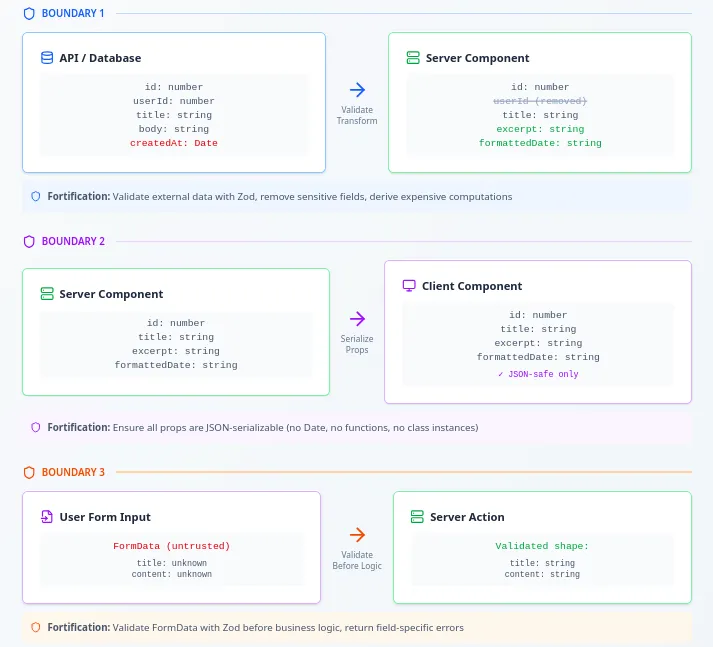
The Solution: Build a Fortified Data Pipeline
Here’s what a proper data pipeline looks like in Next.js. I’m using examples from the Shape Flow demo app, so you can actually see this working.
The Pipeline
[API/JSON Shape]
{
  id: 1,
  userId: 42,
  title: "Some Post",
  body: "Full content here...",
  createdAt: "2026-01-15T10:30:00.000Z"
}

↓ Boundary 1: Validate & Transform in getPosts()

[Server Shape]
{
  id: 1,
  title: "Some Post",
  body: "Full content here...",
  excerpt: "Full content...",
  formattedDate: "Jan 15, 2026"
  // userId removed (security)
}

↓ Boundary 2: Serialize & Pass via Props

[Client Props]
{
  id: 1,
  title: "Some Post",
  excerpt: "Full content...",
  formattedDate: "Jan 15, 2026"
  // Only JSON-safe primitives
}

↑ Boundary 3: Validate Input in Server Action

[Form Data]
{
  title: string,
  content: string
}
Notice what’s happening:
- Boundary 1: We transform the ISO date string into a readable format, generate an excerpt, and drop
userId(client doesn’t need it). - Boundary 2: Only serializable primitives cross to the client. No Date objects, no functions, nothing fancy.
- Boundary 3: Raw form input gets validated before touching any business logic.
Now let’s look at the actual types:
// types/posts.ts

// Shape 1: What the API gives us
export const APIPostSchema = z.object({
  id: z.number(),
  userId: z.number(),
  title: z.string(),
  body: z.string(),
  createdAt: z.coerce.date(), // Coerce ISO string to Date
});

// Shape 2: What we use on the server
export interface ServerPost {
  id: number;
  title: string;
  body: string;
  excerpt: string;           // Derived from body
  formattedDate: string;     // Transformed from createdAt
  // userId removed for security
}

// Shape 3: What crosses to the client
export interface ClientPost {
  id: number;
  title: string;
  excerpt: string;
  formattedDate: string;
  // No Date objects
  // No functions
  // Only JSON primitives
}
Three shapes. Three boundaries. Each one intentionally designed.
Implementation: Fortifying the Three Boundaries
Let’s get into the actual code. All of this is from the Shape Flow demo, so you can copy-paste and adapt it.
Boundary 1: External API → Server Component
The rule: Never trust external data. Validate and transform immediately.
// lib/posts/api.ts
import { APIPostSchema, type ClientPost } from '@/types/posts';
import { transformPostsForClient } from './transforms';
import { logBoundary } from '@/lib/utils/boundary-logger';
import { z } from 'zod';
import postsData from '@/data/posts.json';

export async function getPosts(): Promise<ClientPost[]> {
  try {
    // STEP 1: Get raw data (from API, DB, whatever)
    const rawData = postsData;

    // STEP 2: VALIDATE with Zod
    const validationResult = z.array(APIPostSchema).safeParse(rawData);

    if (!validationResult.success) {
      console.error('API data validation failed:', validationResult.error);
      throw new Error('Invalid API response shape');
    }

    const validatedPosts = validationResult.data;

    // STEP 3: TRANSFORM to client-safe shape
    const clientPosts = transformPostsForClient(validatedPosts);

    // STEP 4: LOG in development (helps you see what's happening)
    logBoundary(
      'API',
      'External API → Client Posts',
      validatedPosts,
      clientPosts,
      'Validated, removed userId, generated excerpts, formatted dates'
    );

    return clientPosts;

  } catch (error) {
    console.error('Error in getPosts:', error);
    throw error;
  }
}
And here’s the transformation logic:
// lib/posts/transforms.ts

export function apiToServerPost(apiPost: APIPost): ServerPost {
  return {
    id: apiPost.id,
    title: apiPost.title,
    body: apiPost.body,
    excerpt: generateExcerpt(apiPost.body),        // Compute once
    formattedDate: formatDate(apiPost.createdAt),  // Format once
    // userId removed (security boundary)
  };
}

export function formatDate(date: Date): string {
  const months = ['Jan', 'Feb', 'Mar', 'Apr', 'May', 'Jun',
                  'Jul', 'Aug', 'Sep', 'Oct', 'Nov', 'Dec'];

  return `${months[date.getMonth()]} ${date.getDate()}, ${date.getFullYear()}`;
}

export function generateExcerpt(body: string, maxLength = 150): string {
  if (body.length <= maxLength) return body;

  const truncated = body.slice(0, maxLength);
  const lastSpace = truncated.lastIndexOf(' ');

  return lastSpace > 0
    ? truncated.slice(0, lastSpace) + '...'
    : truncated + '...';
}
Why are we doing this?
- Remove
userId: Client doesn’t need it. Less data = better performance and security. - Generate
excerpt: Computing this on every render is wasteful. Do it once. - Format date: Same reason. Plus, you get consistent formatting across all clients.
If validation fails, Zod catches it before bad data spreads through your app. This is your first line of defense.
Boundary 2: Server → Client Component
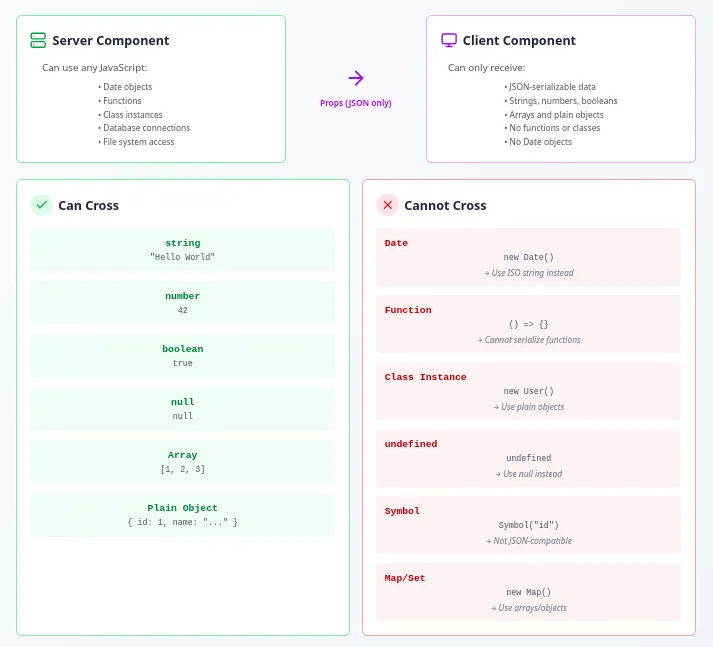
The rule: Client Component props must be 100% JSON-serializable.
This is where most people trip up. Let’s see the wrong way and the right way side by side.
❌ Don’t do this:
const brokenPosts = postsData.map(post => ({
  ...post,
  createdAt: new Date(post.createdAt), // ❌ Date object won't serialize
}));

// Later in your Server Component:
<PostCard post={brokenPost} /> // 💥 Serialization error
✅ Do this instead:
export function serverToClientPost(serverPost: ServerPost): ClientPost {
  return {
    id: serverPost.id,
    title: serverPost.title,
    excerpt: serverPost.excerpt,
    formattedDate: serverPost.formattedDate, // Already a string!
  };
}

// In your Server Component:
<PostCard post={clientPost} /> // ✅ Works perfectly
Your Client Component receives clean, serializable data:
// components/blog/PostCard.tsx
'use client';

import { ClientPost } from '@/types/posts';

interface PostCardProps {
  post: ClientPost;
}

export function PostCard({ post }: PostCardProps) {
  return (
    <div className="border rounded-lg p-6">
      <h2 className="text-2xl font-bold">{post.title}</h2>
      <p className="text-gray-500">{post.formattedDate}</p>
      <p className="mt-4">{post.excerpt}</p>
    </div>
  );
}
Notice what’s NOT happening here:
- No date formatting (already done on server)
- No excerpt generation (already done on server)
- No conditional logic for missing data (validation caught that earlier)
The component just renders. That’s it.
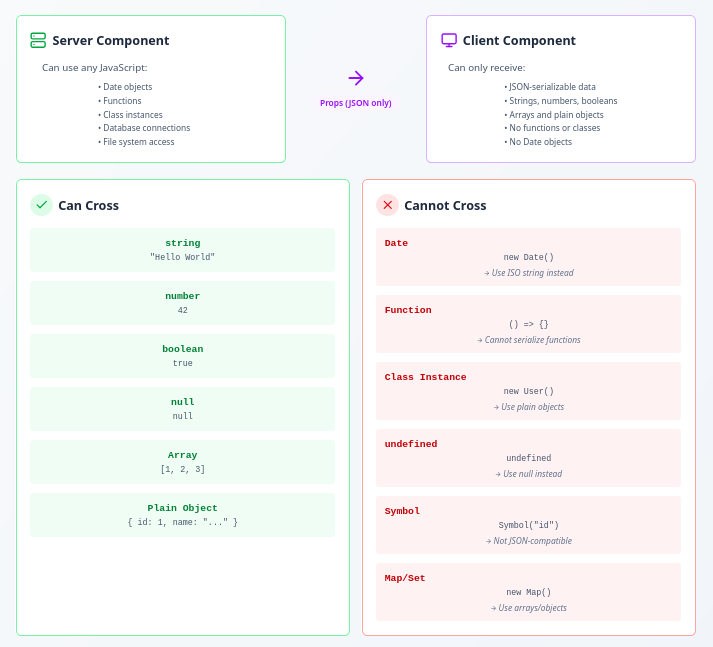
💡 If it can’t be represented in JSON.stringify(), it can’t cross the boundary. When in doubt, transform it on the server: Date → string, function results → data, class instances → plain objects.
Pro tip: Use the boundary logger to see exactly what’s crossing the boundary:
// lib/utils/boundary-logger.ts
export function logBoundary(
  boundaryType: 'API' | 'SERIALIZATION' | 'FORM',
  label: string,
  input: unknown,
  output: unknown
): void {
  if (process.env.NODE_ENV !== 'development') return;

  console.group(`✓ ${label}`);
  console.log('Input Shape:', extractShapeInfo(input));
  console.log('Output Shape:', extractShapeInfo(output));
  console.groupEnd();
}
Run your app in development, open the console, and you’ll see exactly what’s transforming at each boundary.
Boundary 3: Form Input → Server Action
The rule: User input is chaos. Validate it before your business logic even looks at it.
Users can and will send you garbage data. Maybe accidentally, maybe on purpose. Doesn’t matter. Your Server Action should assume the worst.
Here’s how Shape Flow handles form submissions:
// actions/post-actions.ts
'use server';

import { PostFormSchema, type FormActionResult, type ClientPost } from '@/types/posts';
import { revalidatePath } from 'next/cache';

export async function createPost(
  _prevState: FormActionResult<ClientPost> | null,
  formData: FormData
): Promise<FormActionResult<ClientPost>> {
  try {
    // STEP 1: Extract raw form data
    const rawInput = {
      title: formData.get('title'),
      content: formData.get('content'),
    };

    // STEP 2: VALIDATE with Zod (before touching business logic)
    const validationResult = PostFormSchema.safeParse(rawInput);

    if (!validationResult.success) {
      return {
        success: false,
        error: 'Validation failed. Please check your input.',
        fieldErrors: validationResult.error.flatten().fieldErrors,
      };
    }

    // STEP 3: NOW it's safe to use the data
    const validatedData = validationResult.data;

    const newPost = {
      id: Date.now(),
      title: validatedData.title,
      body: validatedData.content,
      createdAt: new Date().toISOString(),
      updatedAt: new Date().toISOString(),
    };

    // Transform to client-safe shape
    const clientPost: ClientPost = {
      id: newPost.id,
      title: newPost.title,
      excerpt: newPost.body.slice(0, 150) + '...',
      formattedDate: formatDate(new Date(newPost.createdAt)),
    };

    revalidatePath('/blog');

    return { success: true, data: clientPost };

  } catch (error) {
    return {
      success: false,
      error: 'An unexpected error occurred',
    };
  }
}
The validation schema is simple but strict:
// types/posts.ts
export const PostFormSchema = z.object({
  title: z
    .string()
    .min(1, 'Title is required')
    .max(200, 'Title must be less than 200 characters')
    .trim(),
  content: z
    .string()
    .min(10, 'Content must be at least 10 characters')
    .max(5000, 'Content must be less than 5000 characters')
    .trim(),
});
And here’s the form in the client:
// components/blog/PostForm.tsx
'use client';

import { useActionState } from 'react';
import { createPost } from '@/actions/post-actions';

export function PostForm() {
  const [state, formAction, isPending] = useActionState(createPost, null);

  return (
    <form action={formAction} className="space-y-4">
      <div>
        <input
          type="text"
          name="title"
          placeholder="Post title"
          disabled={isPending}
          className="w-full px-4 py-2 border rounded"
        />
        {state?.fieldErrors?.title && (
          <p className="text-red-500 text-sm mt-1">
            {state.fieldErrors.title[0]}
          </p>
        )}
      </div>

      <div>
        <textarea
          name="content"
          placeholder="Post content"
          disabled={isPending}
          className="w-full px-4 py-2 border rounded"
          rows={6}
        />
        {state?.fieldErrors?.content && (
          <p className="text-red-500 text-sm mt-1">
            {state.fieldErrors.content[0]}
          </p>
        )}
      </div>

      <button
        type="submit"
        disabled={isPending}
        className="px-6 py-2 bg-blue-500 text-white rounded"
      >
        {isPending ? 'Creating...' : 'Create Post'}
      </button>

      {state?.error && !state.success && (
        <p className="text-red-500">{state.error}</p>
      )}
    </form>
  );
}
Notice how field-specific errors come from the server. The validation happens there, not just on the client (because users can bypass client-side validation with DevTools).
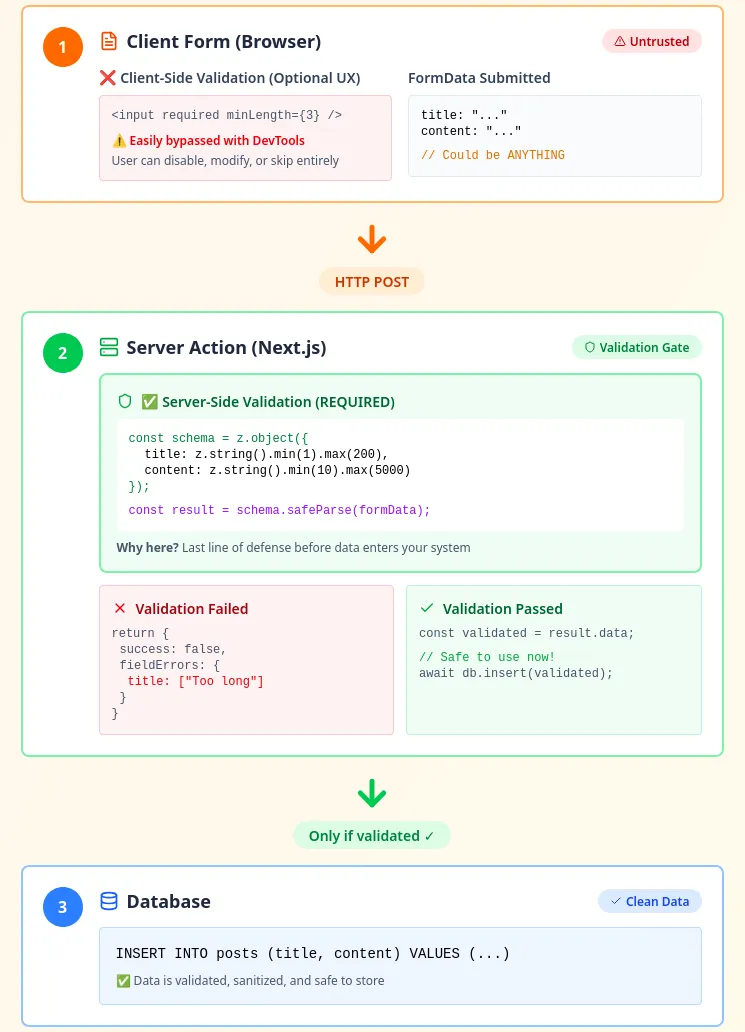
Design Heuristics: When to Transform Data
Okay, so you get the pattern. But when exactly should you transform data? Here’s a decision tree:
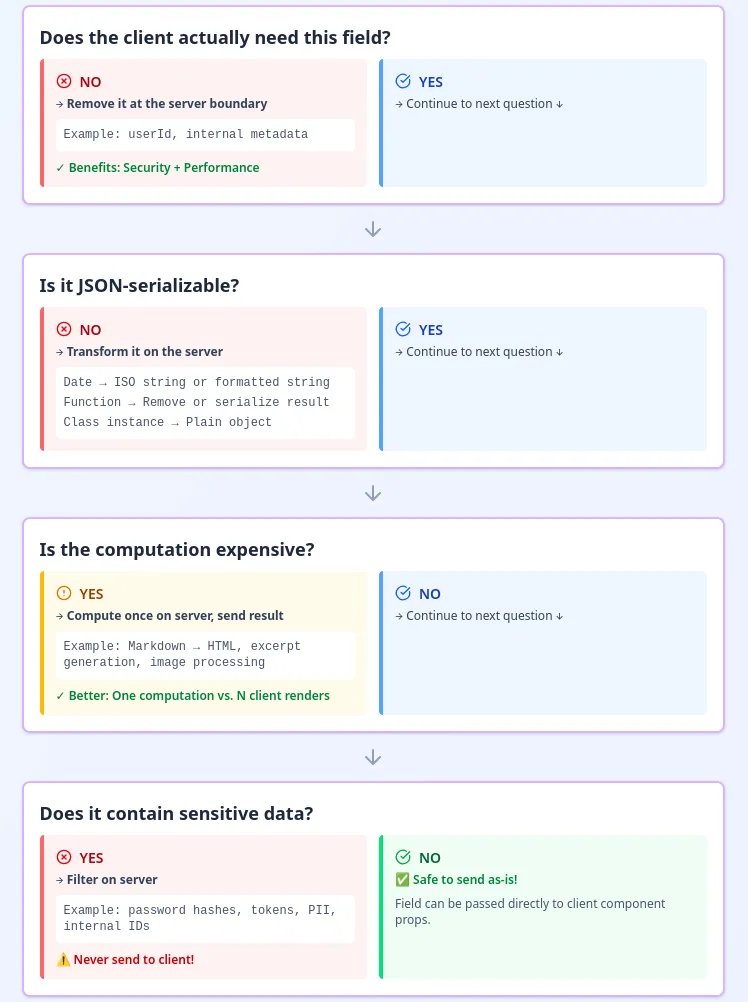
In the Shape Flow example:
- ❌ userId: Client doesn’t need it → Remove
- ❌ createdAt (Date): Not serializable → Transform to
formattedDatestring - ✅ excerpt: Expensive to compute → Generate once on server
- ✅ formattedDate: Need consistency → Format once on server
How Layer 2 Connects to Everything Else
This isn’t just about data. Layer 2 thinking impacts your entire architecture.
Performance (Layer 7 - Cache):
When you derive data like excerpt and formattedDate on the server, you’re making a caching decision. Compute it once, send it everywhere. That’s way better than recalculating on every client render.
API Design (Layer 9 - Protocol):
Your ClientPost shape is basically a versioned contract. If you add a field to ServerPost but not to ClientPost, existing clients don’t break. The Shape Flow demo shows this: body exists in ServerPost for detail pages but not in ClientPost for list views.
Identity (Layer 6 - Reference):
The id field survives every transformation. It’s your stable reference across boundaries; the thread connecting APIPost → ServerPost → ClientPost. Without consistent identity, you can’t track the same entity through different shapes.
State (Layer 1):
Your state shape must match your data shape:
const [posts, setPosts] = useState<ClientPost[]>([]);
//                         ^^^^^^^^^^^^^^^^^^^^
// Wrong type here = entire state system breaks
Effects (Layer 3):
When you fetch data, you need validation:
useEffect(() => {
  fetch('/api/posts')
    .then(res => res.json())
    .then(data => {
      // Without validation, you have no idea if 'data' is correct
      const validated = z.array(ClientPostSchema).parse(data);
      setPosts(validated);
    });
}, []);
Time (Layer 8):
Optimistic updates require shape consistency:
const optimisticPost: ClientPost = {
  id: tempId,
  title: input.title,
  excerpt: input.content.slice(0, 150),
  formattedDate: formatDate(new Date()),
};
// Must exactly match server's eventual response shape
See how it all connects? Layer 2 isn’t isolated. It’s foundational.
Quick Reference: The Boundary Checklist
Here’s your copy-paste checklist. Use it during code reviews.
✓ BOUNDARY 1: API → Server
  [ ] Validate with Zod immediately
  [ ] Transform to internal shape
  [ ] Remove sensitive fields (userId, tokens, etc.)
  [ ] Derive expensive computations (excerpts, formatting)
  [ ] Log transformation in development

✓ BOUNDARY 2: Server → Client
  [ ] All props are JSON-serializable
  [ ] No Date objects (use ISO strings or formatted strings)
  [ ] No functions or class instances
  [ ] No undefined (use null or omit field)
  [ ] Remove fields client doesn't need

✓ BOUNDARY 3: Form → Server Action
  [ ] Validate FormData with Zod before business logic
  [ ] Return field-specific errors for UX
  [ ] Never trust client-side validation alone
  [ ] Log validation failures for debugging

✓ DEVELOPMENT
  [ ] Use boundary logger to visualize transformations
  [ ] Test with broken mode to understand errors
  [ ] Check console for shape mismatch warnings
Try It Yourself
The Shape Flow demo is there for you to poke around. Toggle between ?broken=true and ?broken=false to see the exact errors and fixes. Open the console to see boundary logs. Read the inline comments. Copy the patterns.
The codebase is open source and MIT-licensed. Use it however you want.
Wrapping Up
Next.js gives you three powerful primitives: Server Components, Client Components, and Server Actions. But with those primitives come three critical boundaries where data shapes must transform perfectly.
Your job? Fortify those boundaries. Validate at the gates. Transform intentionally. Log everything in development.
This is Layer 2 from the 9-Layer Mind Stack. It’s one lens out of nine. But master this one, and the others start making more sense.
Data doesn’t exist in isolation. It interacts with State (Layer 1), Effects (Layer 3), Cache (Layer 7), Time (Layer 8), and every other layer. Each one is a different angle on the same system. Learn to see through all of them, and you’ll stop being a frameworker and start being an architect.
Now go fix those boundaries.
Resources
- Shape Flow Demo - Interactive example with broken/fixed modes
- Shape Flow GitHub Repository - Full source code
- The 9-Layer Mind Stack - Complete mental model
- Next.js Data Fetching Docs
- Zod Documentation - Runtime validation library